
Widescreen – Can I Get A Cream To Make It Go Away? – Part 3

I get asked these questions a fair bit, and I also hear them mentioned in general conversation a lot as well. As somebody who prides themselves on knowing a reasonable amount about film (and it’s associated trappings) I figured it would be helpful if I published a Small Words Manual of sorts to help explain all this new, confusing terminology and technology. In this 4 part series, each essay will tackle the common issues that are causing the most confusion, in an easy to understand format that makes sense, and not confuse the issue even further.
In Part 3, we take a look at what Home Theater is, what you should look for when contemplating setting one up, and how to set up your home cinema to sound sweet as!
********************************
Part 1 – What is Home Cinema?
With the advent of VHS tape technology, people had the ability to watch their favourite films at home, on their own TV, allowing time for toilet breaks and munchies without missing a second if they so desired.
The advances of DVD and High Definition technology have only added to the replication of the cinematic presentation in the home. Of course, why go to the cinema to see a film when you could simply replicate the experience in your own lounge room.
Amplifiers, DVD players, speakers and woofers, plasma and LCD, which what how? It all can get a bit confusing for the newbie, so hang on tight, and I’ll try and explain how movie sound works, and what it has managed to do for home cinema technology and playback.

The most well known of all audio systems for cinema’s is Dolby, the guys responsible for the development of the Dolby Stereo process and various audio noise reduction technology. Dolby Digital, which is the most common format for DVD (and in fact is mandatory on all standard DVD releases) is capable of producing 6.1 channels of audio on DVD, allowing for the latest multi-channel surround sound formats to be played back with an appropriate amplifier and speaker set-up. The first cinematic release utilising Dolby 5.1 was Batman Returns.

Competing sound format dts was introduced in 1993 with Jurassic Park, and most audiophiles will often mention that dts allows for a better quality of sound reproduction due to less compression in the mastering format. The actual fact of the matter is that technically, there’s almost no audible difference, in almost every test ever done, on both sides of the market.
That sounds a lot like gobbledygook, right? I know, I know, you have no idea what channels are, and why they are important. And how you can have two competing sound formats (actually, there’s a third, but more on that in Part 4).
Let’s simplify it a little.
Everybody knows that stereo sound is produced using two speakers. The ability to move sound across each speaker, and create panning effects, allows for a much interesting and stimulating audio presentation. Well, audio people call the signal that travels to each speaker a “channel”, which means that in a standard stereo setup, you have “2 channel” audio, or a left and right channel, to choose from.
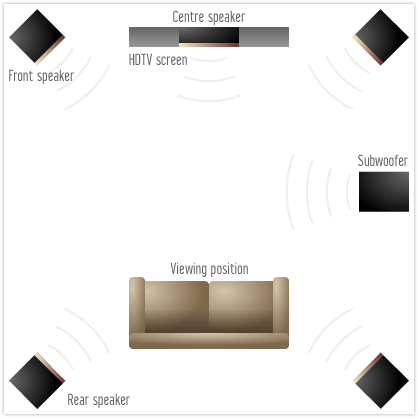
Most major motion pictures today are mixed using a 5.1 channel setup. The “5” is for 5 separate full range audio channels: your left and right main speakers, your center speaker, and two rear speakers. The “.1” in 5.1 indicates the addition of a low frequency channel, utilising a woofer (or subwoofer) to produce all the bass you hear during the course of a film.
In the cinema, you’ll probably notice none of the speakers except the ones along the side of the room and along the back wall. These are the rear channels (simplified in home cinema format by only requiring 2 speakers instead of a multitude), the others are all hidden away behind the cinema screen. Of course, the speakers used in a cinema are substantially larger than those you’d find in any home cinema, but the channels are exactly the same.
Here’s a look at a standard 5.1 surround speaker room setup.
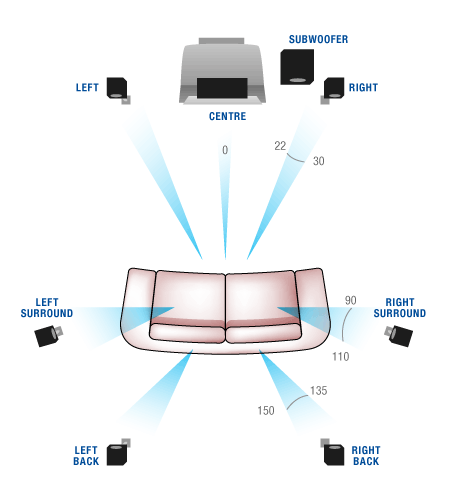
It’s also worth noting that with the advent of BluRay and lossless audio, as well as more refined audio reproduction, Dolby and dts have introduced various forms of 7.1 surround sound audio formats to the market. Originally, Dolby introduced Dolby Digital EX (and first used for The Phantom Menace, the first of the Star Wars Prequels), a sound system that added an extra rear channel of audio information, matrixed (as in, piggybacking on) through the original rear channels of audio. dts came up with a 7.1 system of their own, an audio format known as dts-es, which allowed both a matrixed center rear channel or a discrete option. As digital audio became more sophisticated, this rear channel of audio (nowdays a back left and back right channel, as well as your traditional surround channels) became more and more common, and now with HD master audio, you can have a fully discrete 7.1 system up and going for only a few extra dollars. Below is a schematic of a 7.1 surround system for your home.
With DVD and HD format discs capable of providing more and more channels, the home cinema market has become glutted and confusing with all it’s accessories and whatnot. Here’s a list of everything you actually need to set up your own home theater system to play the movies you watch.
1) Screen – Either a TV, projector, plasma or LCD: this is what your eyes see.
2) Amplifier – In order to power the speakers in your loungeroom, you’ll need to get yourself a 5.1 channel amplifier. Most current release amplifiers will come with HDMI (High Definition Multimedia Interface) ports that allow all your high definition odds and bodds to play, and many high end versions are capable of all the available 7.1 channel audio options.
3) Speakers – The things that produce the sound you hear. 2 x Main Speakers, 1 Centre Speaker, 2 (or 3 or 4) rear speakers, 1 woofer.
4) Software device – A DVD player, a Blu-Ray player, whichever your preference is for the format you want to use.
These are the basics.
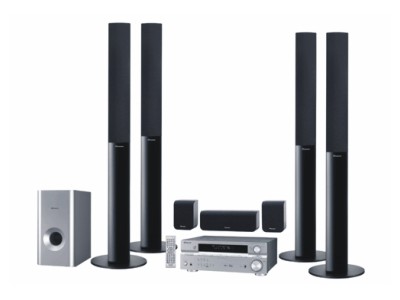
It’s not always required to go hunting for each part of this system: you can actually purchase an “all in one” system, otherwise known as “out of the box” setup. This is essentially a package deal that major manufacturers do as budget oriented selling points; for those with limited budgets, you can still get yourself a surround sound home cinema setup quite cheaply.
These all-in-one systems are generally small, cheap and easy to use. The components all use a single wire to connect them all up. The amount of fine-tuning for sound quality on an all-in-one system is generally fairly limited; or at least more limited than a more complex component system. I’d only recommend all-in-one systems as a starter, or for those living in relatively confined space, such as apartment. They invariably don’t pack the power people want or expect in terms of sound quality, and most people end up blowing speakers trying to achieve decent sound.
Component systems are home cinemas where each part of the setup is individually connected to the other, and they do not all have to be the same brand. You may, for example, have VAF speakers, a Yamaha amplifier, a Toshiba DVD player and a Sony LCD monitor. Each part is purchased according to the buyers requirements for his/her setup, and will be purchased according to a more flexible budgetary outlay. The quality of a component system will almost always be better than an all-in-one. Component systems, by and large, can range anywhere from a few thousand dollars to the hundreds of thousands of dollars.
Part 2 – So what do I spend my money on when buying a home cinema?

Well, the first thing you must do is figure out what your overall budget for the new home cinema is. If you have an initial outlay, then you can purchase the right parts according to how much you can spend. This is important. It’s easy to get carried away with all the new shiny things you can see. Your spending power on a $2000 budget is markedly different than those with, say, a $10,000+ budget. And only spend what you can afford. Over spending on a home cinema is the quickest way to get into debt, and is not really worth the hassle.
A couple of points, first, if I may.
- Stick with name brands.Going the cheap no-name branded goods is simply asking for trouble. they’re cheap for a reason, folks, and if you’re spending money on a decent system, why skimp? Imagine trying to claim a warranty on a cheap, no-hoper brand of speaker when one of the speakers blows up. The more recognised brands are easier to find, replace and keep track of. Stay with a name you recognise, or at least take the advice of a salesperson when you say “I want a name brand”.
- Shop around. It’s a cliche, I know, but it definitely pays to do a bit of searching: both on foot from shop to shop, and via the Internet. If you know anybody who knows anything about home theatre, definitely hit them up for advice. Take them with you if you’re unsure. They’ll feel nice and superior about what they know and you don’t, so exploit this. For goodness sake, don’t just buy the first thing you see: invariably it’ll be cheaper somewhere else and you’ll kick yourself later. Trust me, it happens. I know.
- Don’t believe the salesperson. Most sales people work on commission these days, and in home theater, it’s rare to find somebody not working to make an extra kickback by selling a preferred brand. Make sure you don’t get pressured into purchasing something because it’s the “newest greatest most extraordinary” thing on the market. For those of you searching for a new TV screen, be it plasma or LCD, or a projector or something, ensure you test a few out. Most places will have several brands on offer: check them all out. if you’re after a projector, make sure they unplug the standard one and show you a different one on the shelf. Chances are they’re calibrated the display model to give a boosted (or false) look.. often, you’ll want to see what is better between brands. Take some DVDs with you that you’re familiar with to test out. My suggestions for test discs would be: Gladiator (also good for sound testing), any of the Matrix movies (again, great sound and picture quality). Don’t be afraid to ask to see your own test disc on the shop stuff: after all, you’re the mug whose paying for it, not them. You want to make sure you know what you’re buying. Don’t just take the sales persons word for it.
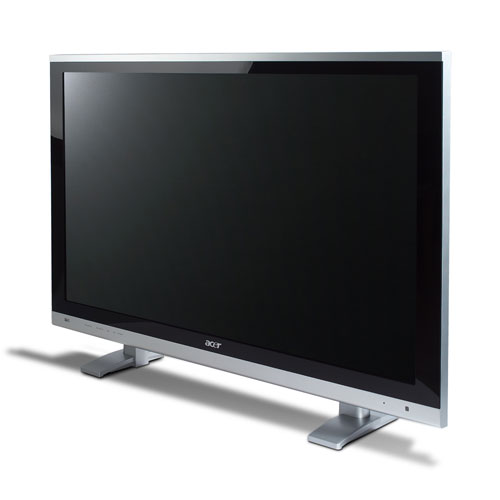
If you’re starting out fresh, the first thing you’ll want to do is get yourself a nice shiny TV screen. Be it a regular TV, a plasma, LCD or even a projector, you’ll want to make sure it’s a good one. After all, you’ll be watching it every time you want to view a movie. If the screen doesn’t live up to your expectations, it’ll be too late to change your mind later. The viewing apparatus is perhaps going to be the most expensive part of your entire home cinema (with the possible exception of your speaker system) so you want to invest the majority of your budget on that.
The next thing you’ll need is something to view DVDs or Blu Ray on. A DVD player will cost you anything from $50 to $500 and above, and Blu Ray is competing well, with many players selling around the $170-$199+ for a basic model. As with most things, the more you spend, the better product you end up getting. Spend a little more on your DVD player and you’ll get one that will last 10 years instead of 1. After all, those lasers and movable parts inside the DVD player will eventually wear out. They don’t last forever. A more expensive player will inevitably draw comparisons against the more budget-oriented versions: don’t be fooled, cheap isn’t always better. Some DVD players have functions that others don’t, and this isn’t always apparent from simply watching a DVD. Different audio functions, picture manipulation, language functions, etc, all vie for attention when it comes to selling the machine. Seriously, none of that really matters. What matters is simply how the film looks and sounds when you’re watching a movie. Nothing else is all that important.

The hub of your home cinema is going to be your receiver. Dont’ confuse a receiver with an amplifier, as they are different beasts. A receiver is a device used to produce the sound signals from many different devices, such as CD players, DVD and Blu Ray players, Laser Disc and LP players, satellite and cable TV signals, etc etc. An amplifier will simply take one signal and give you the sound (usually in stereo). Most receivers on the market today, including the budget versions, will have Dolby 5.1 as a standard, as this has become the accepted norm for sound reproduction.

With the latest HD formats, you’ll also need to ensure your receiver is capable of handling high definition sound signals. HDMI stands for High Definition Multimedia Interface, a cable that runs from your Blu Ray player (or HD TV box) and plugs into the back of your receiver… which then goes to your plasma or LCD screen and the speakers….. ahh, it’s still complicated! For the best possible connection between your BluRay player, your receiver and your monitor, a good quality HDMI cable is the best bet. HDMI cables carry both sound and picture information between devices, and while the default quality is pretty decent, the more expensive cables deliver a superior audio/visual presentation. You’ll need at least two, one for your BluRay-Receiver connection, and one for your Receiver-TV connection. Don’t forget to ask your salesman about this.
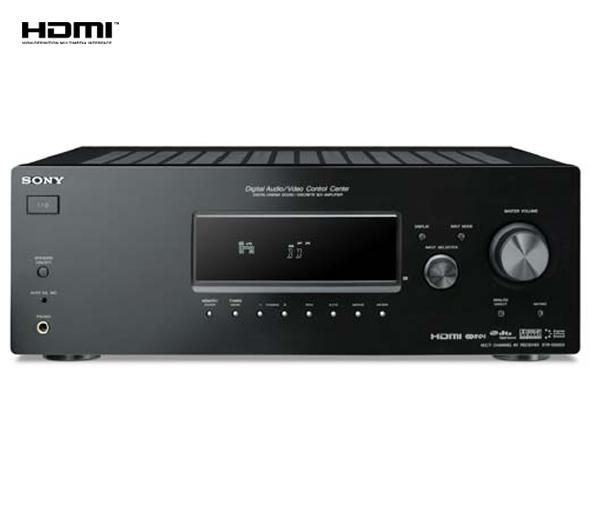
Anyway, you want to look primarily at the power level your amplifier will output; this will tell you how loud and powerful you can go when you want to crank up a loud film. To be honest, I’d ensure you try and get a receiver more powerful than what you currently require; after all, in five years, will you be somewhere else or in a larger space needing more power than your receiver can handle? Most standard size lounge room’s will be easily handled by an receiver producing 100 watts of power per channel, however, if you can get more, do so. The greater the power output per channel (and make sure it’s per 5.1 channels, not per 2 channels) the less likely your speakers will struggle to produce sound at volume. Of course, it makes sense that the larger your room space, the more power you’ll need to draw from your receiver to fill it. Large room, get a better receiver.
Now, a lot of people ask me about the woofer. How large a woofer do you really need? Well, the standard size you’ll find on offer from most retail outlets will be a 10″ Sub. 10 inches may not sound like a lot, but it’s decent enough to fill most room sizes with bass. A 12″ sub will, of course, do more damage to your foundations than a 10″, but of course the cost will go up. Woofers sole purpose is to produce your bass, your deep powerful bowel-trembling low frequency audio that accompanies almost every action film Hollywood has ever produced. Explosions, music, car chases, gunfire….. almost every part of a film these days produces a certain level of low frequency sound, which is handled solely by your sub. So you’ll need to ensure your woofer is capable of delivering the LFE (Low Frequency Effects) required by most modern film soundtracks.
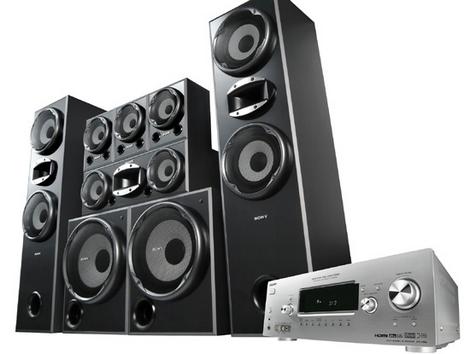
Speakers are a different kettle of fish altogether. Ideally, it’s preferred to “timbre match” your speakers; that is, keep each speaker the same brand (and particularly the same model type) to ensure continuity of sound around the room. Local SA speaker manufacturer’s VAF, for example, provide high quality speakers that are tonally matched to produce the same sound through each speaker. If you have some VAF mains, a DB Dynamics center speaker and some Yamaha rears, the sound will still be there, but it may sound different if any panning takes place throughout the sound-field. Keep each speaker (with the possible exception of the woofer) the same brand, where possible. Of course, you might want to mix and match. It’s all part of the fun of setting your home cinema up, of tweaking things here and there, changing setups around occasionally to get the “right” sound.
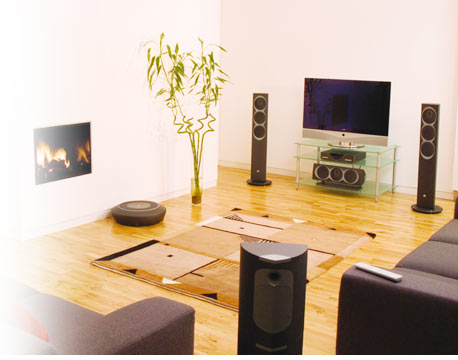
Obviously, your main speakers will need to be quite good, as they produce about half the films overall sound, from music to effects and other things. The centre channel is vitally important, as it is the one channel that produces the dialogue, main on-screen effects, major musical segments and all on-screen action. Rear channels provide about a quarter of all 5.1 soundtrack audio, and traditionally are not as large as the front three speakers. Decent speakers, coupled with a good quality woofer, will produce cinema-like sound in your own home.
Part 3 – I’ve connected my home cinema. Now, how do I get it to sound right?
This is the most common problem with a lot of folks trying to set up their come cinema correctly. Many people who purchase Out-of-the-box systems have it fairly easy, just plug in each speaker, position them to approximate a 5.1 environment, and away you go. But there are a few tricks to getting the right sound and picture for your nice new HD setup. First, I want to tackle the picture quality, because that’s something a lot of people don’t think of when they start watching movies. Please note, the below notes are written as a guide, and should in no way be the hard-and-fast rules you use to set up your system. Room sizes, windows and lighting, as well as practical elements such as being allowed to hand speakers on a wall or three, should all be taken into consideration. The notes below are intended as Best Case Scenario only. Modify your set-up according to your own situation. [Editors note – we’ve assumed those of you with projection systems and other high-end monitors will know how to set up a home cinema. This review is written for the novice or beginner, and so we’ve assumed a basic knowledge of terminology and competence with regards to this article.]
Part 3.1 – Picture Setup.
My first piece of advice for serious home cinema folks is to get yourself a reference quality HD calibration disc, which will allow you to set your TV settings correctly. Often, the factory settings aren’t the best for perfect picture viewing, and so some minor tweaking of the TV will assist attaining just the right balance of light and shade in your BluRay/HD experience. Most TV’s come with a series of default settings, usually titled something like “Sports” or “Cinema” or “Movie” or something, which alters things like brightness and contrast to highlight just how clever the manufacturers are. Calibration discs can be purchased in a variety of sizes and styles, all online, so for the serious film fan, I suggest getting one to ensure you’re doing it right!
First, make sure your TV is connected to the device you’re going to be using the most, such as a BluRay player. If you do not have a setup disc, that’s okay. Set your room up to be how you’d spend your time watching a film (for the sake of argument, I’m going to assume that everyone reading this will be watching more films than anything else!), be it with the lights off, the curtains drawn, or whatever way you like to enjoy your TV time. Once this is done, check behind you for reflections and light sources. Light from behind can reflect on the screen, resulting in eye fatigue if bright and constant enough, and can make watching a film (especially a dimly lit film!) hard work. If possible or practical, remove or mitigate any light sources from behind you.
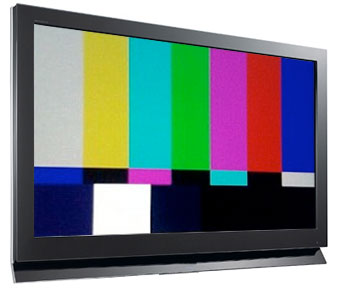
Secondly, turn on your TV and ensure a BluRay or DVD is playing, preferably the highest picture quality the better. Make sure your DVD/BluRay player is set to “16×9” or “anamorphic on” or whatever label your manufacturer has given the enhanced playback option for HD/DVD. Your TV’s brightness setting, which is usually set to “default” by the TV manufacturer, should be lowered about 5-10% from the default mark. Your TV’s contrast level should also be raised between 3-7% above the default level. Colour levels can be fiddled with as much as you’d like, but the default on most TV’s is okay for that. If you have the ability to “save” this setting, you should do so for ease of resetting should your viewing scenario change. Note: this is not a definitive setup for your TV. Your own viewing preferences should be taken into consideration, and you should definitely have a play with your TV to see how good (and bad) it can look. Have a fiddle, and see what happens!
A more thorough picture setting can be accomplished with the use of a calibration disc. We swear by Video Essentials here at fernbyfilms.com, so we’ve given you the link to their calibration disc page.
Part 3.2 – Audio & Speaker Placement.
Among the most critical elements in any home cinema is speaker placement. Most plug-and-play systems, as well as most new HDMI-equipped receivers, have an automatic sound setup function, whereby a small microphone is positioned at the most common seating position, and the system sends out a signal to determine just how far away, apart and around your speakers have been positioned, to give you the most accurate sonic replication possible. But some folks stick their speakers, especially the pesky rear channel ones, almost anywhere except where they’re supposed to go, and thus have an audio field that’s not conducive to quality audio reproduction. Take note: even the cheaper end audio systems can sound pretty damn good if calibrated correctly. Don’t think that just because you’re cheap and spent a pittance to have surround sound that it can’t sound okay too.
Firstly, your main speakers should be equidistant spacing from your TV. They can sit next to the TV, six feet away from it – whatever, just as long as the distance between each main speaker and your TV is the same. I also sit my main speakers a few inches further towards the listener than the center speaker. The center speaker, perhaps the most abused of all 5.1 system speakers, should be as close to, if not directly above or below, your TV as possible. The main film audio is reproduced here, and it’s invariably what you see happening on the screen, so you need to ensure the audio from your center channel is as close to the screen as possible. The majority recommend having your center speaker immediately below the TV.
Your rear speakers, be they for a 5.1 or a 7.1 system, should be positioned approximately a foot above the horizontal of your default listening position. Draw a line from your ear to the wall to your right, and then move that mark up about a foot. This is the position for your right surround speaker. It should be either equal to, or preferably about a foot behind your listening position, so move that mark you just made towards the back of the room about a foot. Speaker angle is, to a large degree, irrelevant, although purists would have you angle the speaker in towards your head. Repeat this procedure with the left surround channel. 7.1 system centre-rear channel speaker placement is equally important, and no less easy. The back right and left speaker position should be, once again, about a foot above your listening position on the very back wall, and depending on how wide your room is, equi-distant between the right and left surround speaker. See the above floor-plan diagrams in Part 1, for this information.
Another key element with regards to home cinema sound is the position of your subwoofer. Regardless of size, your subwoofer will produce its best sound when positioned either against a wall, or in a corner of a room. Most diagrams for 5.1 speaker placement have your subwoofer located somewhere between the center channel and one of the main speakers. This is okay, but the bass produced here is nowhere near as good as it could be. Take my advice, position your subwoofer as close to a wall as possible, or for best results, in the corner of a room. Since bass is omni-directional, and the idea is not to be able to tell where it’s coming from, a room corner amplifies the produced bass signal significantly, allowing for smoother, deeper bass to resound throughout the room. You know how your voice echoes when you are floating down a river where there’s cliffs on either side. The sound of your voice hits one of the cliff faces, and is reflected back towards the other, resulting in a significant echo. The same principle applies here.
A side note, on subwoofers, if I may. With bass, volume doesn’t mean quality. Just because you love heaps of bass, doesn’t mean you need to turn your woofer up to 11. The bass should sound tight and complement the audio, rather than overpower it. “Wobbly” or “loose” bass, bass which is indistinct and lacks subtlety, is a sign of an improperly calibrated audio system, or a badly overdriven subwoofer. This is particularly aimed at those with a comp0nent system, not those with an out-of-the-box setup. Be aware also of bass “dead spots” in your viewing room, and spend a bit of time repositioning your subwoofer to achieve the best possible bass output that fills the entire room, not just your listening position. Most subwoofers (especially the high-ends ones) will have a phase switch on them, allowing you to effectively “reverse” the bass output so it doesn’t counteract the signals from the other speakers. This is also key if you have more than one subwoofer in your system.
Of course, speaker placement will depend on a number of things, such as the ability to hand rear speakers on walls around the room, or the large subwoofer to dominate a corner which would otherwise have a chair, sidetable or other piece of furniture in it. If a compromise must be made, then it must be made.
Again, to properly set up your audio system, DVDs and HD format calibration discs are available online, and are highly recommended by us here at fernbyfilms.com. We use one ourselves, and we’re thoroughly happy.
***************************




Who wrote this?